
New in version 2025-2
The new release focus on making it easy to create different types of agroforestry design documentation, including a updated 2D design view, export options for 2D planting plans and export options for planting lists and system geometries. The release also include some minor improvements to the design workflow, including custom presets and a simplified interface.
Full feature list in RegenWorks 2025-2
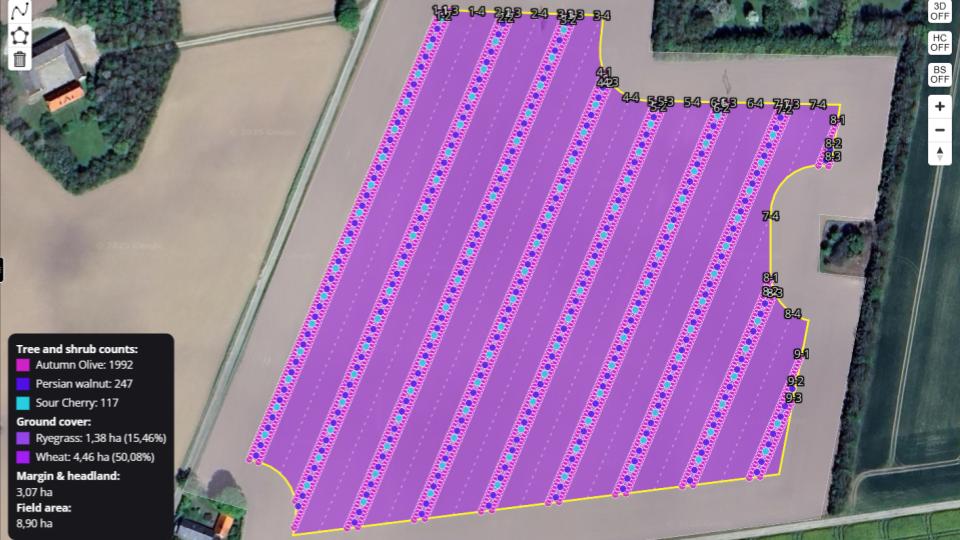
Improved 2D design view: The 2D design view has been updated to include a lot more information. This includes tree species color legends, row reference numbers, individual tree row counts and more. This makes it a lot easier to communicate designs for feedback and implementation.
Updated preview functionality: All the new improvements to the 2D view have also been implemented in the preview functionality where you can share designs with others through a URL. See an example here.
2D and 3D image exports (PNG): The days of low res-screenshots are over! It’s now possible to export 2D planting plans and 3D visualizations as PNG directly in RegenWorks. This can be used to physically print planting plants or to be inserted in reports.
Full 2D drawing export (GeoJSON, KML): Export all features (trees, rows, areas) in one single file.
Export selected rows and tree strips (GeoJSON, KML): Feature for exporting select set of geometries. Useful for creating digital twins where you want only the trees or for exporting only the tree strips for farm subsidy registration.
Planting list exports (CSV): Export planting lists that match teh 2D planting plans.
Custom presets: You can now create your own design presets (Templates) and save them for future use. This makes it fast to get started on new projects as you don’t have to start from scratch.
Simplified design workflow: The design interface has been simplified, to reduce redundant steps and increase efficiency while navigating the software.
We continuously release new improved versions of the software and always value input and feedback from existing users. So check out our roadmap here. To provide feedback and upvote new features visit our discord here.